On the bridge of the Enterprise, nobody has to open an app. Captain Kirk presses a button on his armrest, says "Kirk to engineering", and Scotty answers. No password, no update, no "let me just restart it". Communications officer Lieutenant Uhura makes sure it simply works.
That is what I want too. Not for a starship, but for my mother.
The problem: technology that gets in people's way
Calling Mum sounds simple. But for someone of her age, a smartphone is a maze: screens that lock themselves, an app that wants an update right now, a volume button that is hard to find, sound that is too quiet if your hearing is not what it used to be. A computer can take minutes before you can do anything at all. For a techie that is a detail. For the person who has to use it, it is a hurdle, and a hurdle means you talk to each other less often.
So I am building an intercom. In the repository it is called UHURA (the network packets literally start with the letters 'UHUR'), although the description already hints at a later name: the JoMama intercom.
What it is: one button is one person
The end goal is not an app, but a sturdy box with big buttons:
- One button = one person. Press it to talk to that person, release it when you are done. Push-to-talk, like a walkie-talkie.
- One light = one meaning. Green next to a name: that person is reachable. Yellow or white: that person is talking to you right now. A red "MIC ON" light: your microphone is open. No blink codes, no menus, and you can always see whether anyone can hear you.
- On in about two seconds. Plug it in, the lights come on almost immediately, and as soon as Wi-Fi is connected you can talk. There is no operating system that first needs a minute to boot.
- Loud and clear. The design assumes a powerful amplifier, a filter that removes rumble and pops, and automatic volume control, so a soft voice and a loud voice both come through clearly and without distortion. Exactly what you want when someone is hard of hearing.
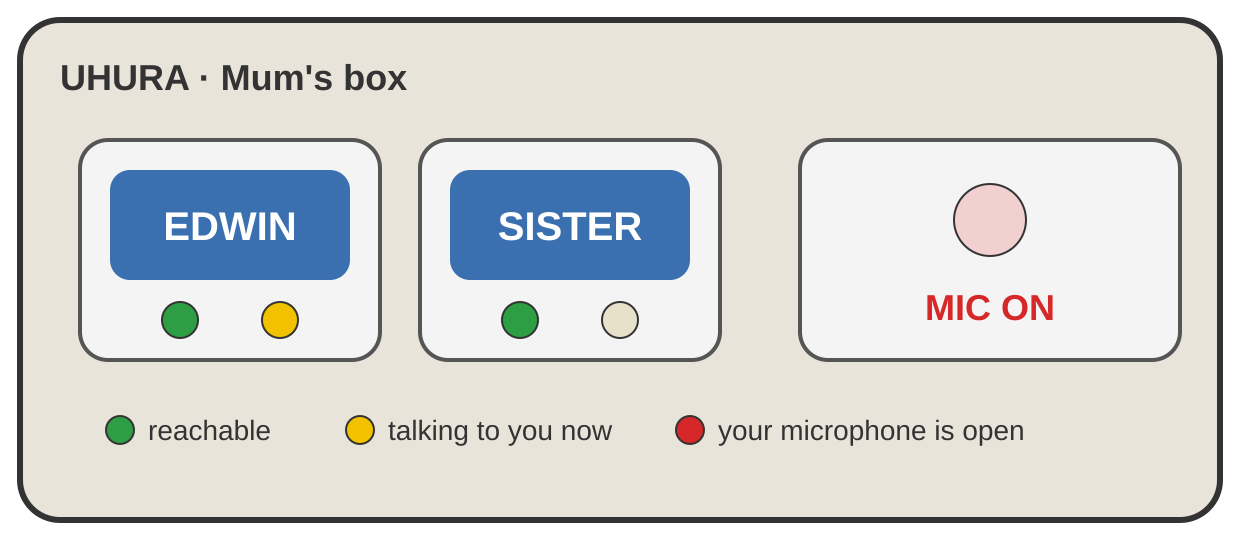
And then there are the Circles. I can talk to Mum and to my sister. My sister can also talk to her mother-in-law, without the mother-in-law showing up on a button on my box. Everyone only sees the people in their own circles. You pair a box with a short code, and after that it just does what it should.
Why it is fun: real engineering under a simple button
Behind that single button is exactly the kind of puzzle I enjoy.
The audio travels over the network as Opus: 48 kHz, in packets of 10 milliseconds. On the local network or over a VPN your voice reaches the other side in roughly 25 to 45 milliseconds. If a packet gets lost on the way, forward error correction and packet loss concealment cover it up, so you do not hear gaps.
The whole system uses malloc zero times. Even the Opus codec runs on buffers that are fixed in advance, about 290 KB in total. On a microcontroller that is not showing off, it is self-defence: memory you never ask for cannot run out on some odd Tuesday evening.
All the clever logic (protocol, codec, jitter buffer, push-to-talk) lives in a single core written in strict C23, without a single line of Linux- or ESP32-specific code. That core builds on a PC in about two seconds and is tested there automatically. So I can test an odd network edge case in seconds on my laptop, instead of flashing firmware over and over and guessing with two circuit boards.
The network itself is an adventure. At Mum's house it has to work without anyone setting up a VPN. In the lab at the university you are behind Eduroam, where strict firewalls block most traffic. The plan is a connection ladder: first directly on the local network, then straight across the internet using UDP hole punching, and as a last resort encrypted over port 443, the port that is open almost everywhere. Because the audio is encrypted end to end, the server that relays the traffic can never listen in.
I do not have to reinvent everything either. From microlink, a VPN client for the ESP32, come the crypto building blocks and the trick for getting through strict networks via port 443. From my Energy Owl project come the Wi-Fi settings with three remembered networks and a one-time setup portal on your phone. That way the box can remember Mum's Wi-Fi, my workbench Wi-Fi and my phone's hotspot at the same time.
Why it matters: engineering, not typing
UHURA is also a teaching project at Fontys ICT. The question behind it: how do you build serious systems with AI agents such as Claude and Gemini, without ending up with a pile of fragile spaghetti?
My answer, and you can see it throughout the repository: typing in code is no longer the bottleneck. Software engineering matters more than ever. An agent writes code at lightning speed, but it does not know by itself that someone who is hard of hearing does not want a touchscreen. Nor does it know that the ESP32's audio buffers must not sit in external memory while the chip writes to flash, because the sound will start to stutter. A human has to ask those questions.
That is why the project follows a fixed order:
- Start with the person. What does Mum really need? Not more features, but fewer hurdles.
- Ask the hard questions up front and record the decisions, with the reasoning, before there is any code.
- Give the agent strict rules.
AGENTS.mdsays: first an approved design, only then code. No dynamic memory, no global variables, and strict rules in the spirit of NASA's Power of 10. - Test everything deterministically, on the PC, before it ever runs on real hardware.
Students can use the repository as study material: start with AGENTS.md, read the design and the decisions, and then see how they turn into source code.
Where are we now?
Phase 1 is done. The core and a Linux version of the intercom work: Opus audio, the 'UHUR' protocol, the jitter buffer, push-to-talk with a call tone, and five test suites that run on the PC. You can already talk between several stations over LAN or WireGuard, for example between a PC and a Raspberry Pi with a USB speakerphone.
Next comes the real box:
- Phase 2: speech filter and volume control, and the ESP32 hardware: microphone, amplifier, buttons and lights.
- Phase 3: Wi-Fi setup from your phone, with three remembered networks.
- Phase 4: end-to-end encryption, and staying connected when an IP address changes.
- Phase 5: managing the Circles and the Eduroam route over port 443.
- Phase 6: echo cancellation, so you can also talk hands-free at the same time.
Back in 2019 I already wrote here about an encrypted intercom. So the idea is not new, but the tools are. The end goal is still the same: a box in Mum's living room, one button with my name on it, and a green light that tells her I am there.
Want to follow along, think along, or build a box yourself? Everything is open on GitHub: chat-l18l/uhura_intercom.
This article is part of the series Building with AI agents: projects I build together with AI agents. That link takes you to every part of the series, including new ones.
Lees dit artikel in het Nederlands: UHURA: een Star Trek-intercom om met Ma te praten
Reacties