Yesterday I wrote about UHURA, the Star Trek intercom for talking to my mum. Then Mum herself came up with an idea. A better idea than mine.
"Can't you just call through the intercom from your house: Mum, are you all right? And then the box can hear me for thirty seconds, without me having to crawl to the button? Even if I'm lying behind the hallway door, I can still call out or bang on the door with my fist. Then you know you have to come."
That is exactly where all wearable tech fails. The phone is in the living room. The smartwatch is on its charger. The alarm pendant comes off in bed or in the shower, while the bathroom with its wet tiles is the most dangerous place in the house. So UHURA now has a new feature: Call & Listen.
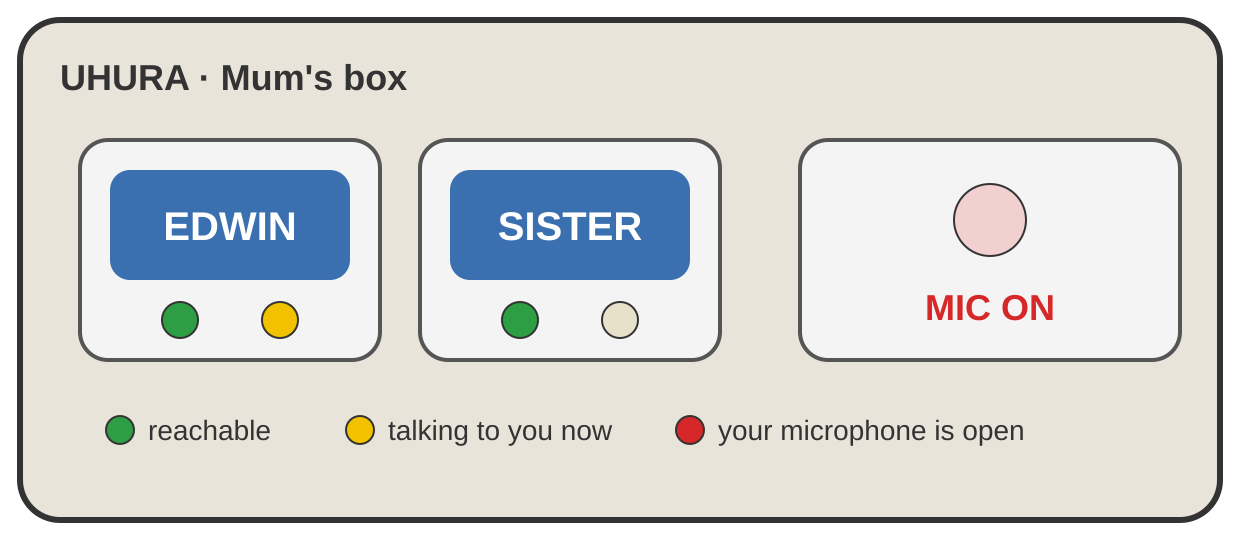
The red MIC ON light plays the lead role in this update: it is always on when sound leaves the house.
How it works
- My sister or I start a wellbeing call to Mum's house.
- Every box in her house switches to 100% emergency volume, even if it was set to 10% for the evening or 0% at night. First a clear call tone, then my voice: "Mum, is everything OK? Call out or knock on the door."
- When I release my button, Mum's box plays a short "I'm listening" tone, the red MIC ON light comes on, and the microphone stays open for exactly 30 seconds, to me only. She does not have to reach the box.
- After 30 seconds the microphone closes with a closing tone, the light goes off and the volume is back where Mum had it. If she happens to walk past the box, one press on a button stops the listening at once.
Not a bug in the house
A microphone you can switch on from outside is a privacy problem if you design it carelessly. You would build a listening device by accident. So there are fixed rules in the core of the software:
- Permission per person, on Mum's own box. Everyone starts without listening rights. Mum can have a chat with the neighbour, but only my sister and I can open the listening window. A central server cannot grant that right.
- Never longer than 30 seconds. There is no command to leave the microphone open until further notice. Even if the connection drops, it closes after 30 seconds.
- Never silent. Opening always comes with an audible tone and the red light.
- No replayed packets. The call itself does not open the microphone. Mum's box first sends a fresh 64-bit number, and my box must give the right answer within 2 seconds. Replaying an old, intercepted packet does not work.
To be honest: in the current prototype that answer does not use a secret key yet. It stops old packets, but not yet someone who is watching the network live. The real cryptographic signature arrives together with end-to-end encryption in phase 4. Until then, the prototype is meant only for the local network or a VPN.
Why your phone erases knocking
Working through the scenario "someone is lying six metres away behind a door, knocking on the wood" turned up three nice audio puzzles.
Voice codecs filter out knocking. A phone is trained to treat everything that is not a voice as noise. A dull bang on a bathroom door or shuffling in the hallway gets neatly polished away. So during the listening window UHURA switches the Opus codec from voice mode to automatic mode, without noise suppression. That costs not a single extra byte of memory.
Lots of gain without feedback. During those 30 seconds, Mum's speaker is completely off. Because speaker and microphone are never on at the same time, the microphone can safely go 24 dB (16 times) louder. That way you also hear a soft call from six metres away. A fast limiter protects my ears if something loud falls right next to the box. No echo cancellation needed.
The pre-tone trick. If the "I'm listening" tone plays while that sensitive microphone is already open, I get my own beep back at full blast. So the microphone stays closed for the first 120 milliseconds while the tone plays. Only then does the speaker go off and the microphone open.
More boxes in one house
Mum can also have two or three boxes, for example in the living room downstairs and on the landing upstairs near the bedroom and bathroom. A wellbeing call then rings everywhere at once, and afterwards they all listen for 30 seconds. Because all speakers in the house go off at the same time, they cannot feed back between floors either.
There was a pitfall here too. If Mum is upstairs and it is dead quiet downstairs, a naive 24 dB gain would blow up the empty room's own noise 16 times, right over the calling from upstairs. So in a quiet room the gain is capped at 6 dB, and the full 24 dB is only released when there is real sound. On my box I can see straight away which room the sound comes from. On my way there, I already know which floor she is on.
Proven on the PC first
Like the rest of UHURA, this feature lives in the core, in strict C23, separate from Linux and the ESP32. A new test simulates four complete boxes: me, Mum downstairs at 0% night volume, Mum upstairs with soft knocking, and a neighbour without permission. The test checks that the neighbour can never open the microphone, that Mum's boxes go to 100% for my call, that the knocking is picked up upstairs and not downstairs, that only I receive the audio, that everything closes again afterwards, and that an intercepted packet is rejected. All seven test suites pass in 0.04 seconds.
If you want to try it yourself, you can already test it on two PCs. The commands are in the README on GitHub.
What's next?
The next step is the real hardware: an ESP32 with a sensitive I2S microphone, tested at six to eight metres and behind a closed door. The wellbeing call gets its own button or a combination of two buttons, so you never start it by accident. And the listening permission is set on Mum's own box, confirmed with a press on that box's button.
What I like most about this update is that it did not come from a meeting room, but from Mum. She did not ask for more features, but for thirty seconds that matter.
The design with all the safety trade-offs is in DESIGN_CARE_LISTEN.md, the code in chat-l18l/uhura_intercom. You can also follow UHURA on Elektor Labs.
This article is part of the series Building with AI agents: projects I build together with AI agents. That link takes you to every part of the series, including new ones.
Reacties